
Building an Online Store Without Shopify (Step-by-Step Guide)
You don’t have to use Shopify to start selling online. By choosing the right infrastructure, you can complete the process of building an e-commerce store with full control and more flexibility in the long run. In this guide, I explain the steps to build an online store without Shopify with a clear plan: choosing the platform, domain & hosting, setup, payment & shipping, RankMath SEO, and getting ready to launch.
Why Does It Make Sense to Build an Online Store Without Shopify?
Shopify can help you start fast, but it isn’t the best option for every business. Non-Shopify solutions can offer major advantages in terms of cost and control. If your goal is strong SEO performance, content creation, and optimizing category/product pages, solutions like WordPress stand out.
- You become less dependent on monthly platform fees
- You gain more control over design, SEO, payments, and integrations
- Scaling and customization are more flexible in the long term
- It’s easier to adapt to payment and shipping needs in Türkiye and Europe
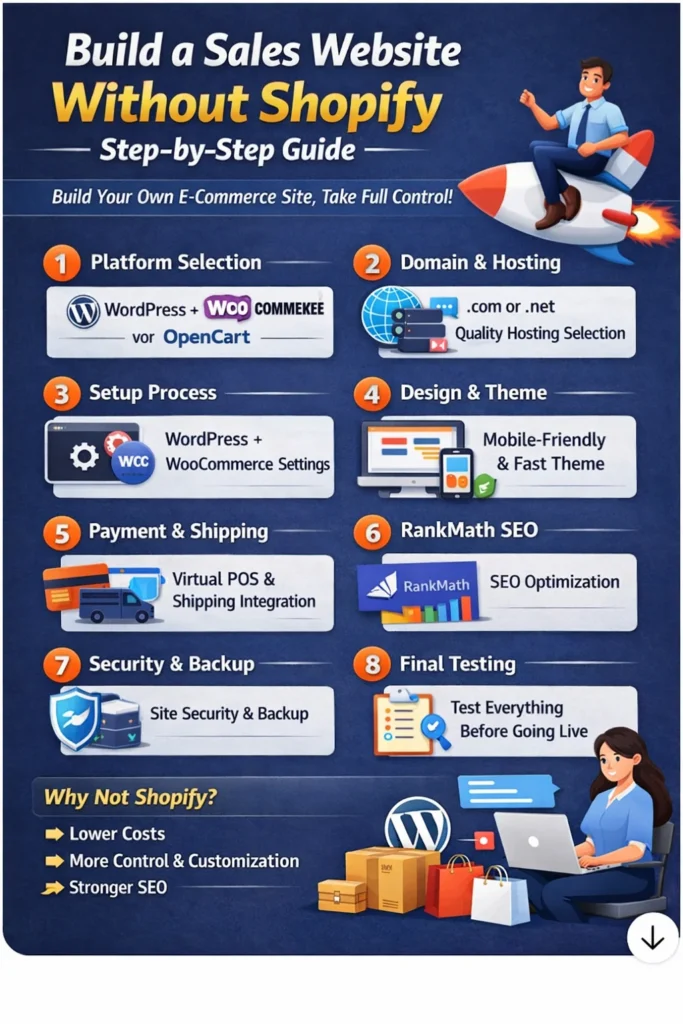
1) Choosing the Right Platform for Building an Online Store
The first step in building an online store without Shopify is choosing the right platform. Your platform choice directly affects cost, ease of management, SEO results, and integration options. For beginners, the best approach is to start with a system that is easy to manage and has strong community support—then improve it as you grow.
- WordPress + WooCommerce: The most balanced option for beginners and SMEs
- OpenCart / PrestaShop: More e-commerce focused dashboards, but requires a bit more technical setup
- Custom development: Requires a large budget and ongoing maintenance (best for large scale)
- Selection criteria: budget, technical support, SEO goals, growth plan
2) Domain and Hosting Selection
To build a solid e-commerce store, domain and hosting selection is critical. If your hosting quality is poor, your site slows down, customers drop off during checkout, and SEO performance suffers. Your domain impacts brand perception and memorability.
- When choosing a domain
- Keep it short, easy to type, and memorable
- Make it consistent with your brand name
- Choose the extension based on your target market: .com / .com.tr / .de / .be
- When choosing hosting
- Must provide free SSL (https)
- SSD/NVMe storage and strong performance
- Daily backups should be included
- Easy to upgrade when traffic increases
- PHP 8.1+ and strong database performance
3) WordPress + WooCommerce Setup
The most practical way to build an online store without Shopify is WordPress + WooCommerce. The goal here is not just “installing a website,” but making the store ready to sell. Currency, tax, shipping, and legal pages should be configured correctly from the start.
- Installation steps
- Install WordPress from your hosting control panel
- Activate SSL and force the entire site to https
- Install WooCommerce and complete the setup wizard
- Store settings
- Currency and country settings
- Tax/VAT rules
- Shipping zones and shipping fees
- Required pages
- About, Contact, FAQ
- Privacy/KVKK, Cookie Policy
- Returns/Exchanges, Distance Sales Agreement
4) Theme and Design (Conversion-Focused)
In the process of building an online store, the job of design is not only to “look good,” but also to “make people buy.” Designs that are not mobile-friendly, load slowly, or don’t feel trustworthy reduce sales. Your goal is to guide the user quickly to the product, cart, and checkout.
- Theme selection criteria
- Mobile responsive
- Fast and lightweight
- Fully compatible with WooCommerce
- Sales-focused structure
- Clear CTAs: “Add to Cart”, “Buy Now”
- Trust elements: returns, secure payment, reviews, SSL
- Keep the menu simple—avoid unnecessary page clutter
- Homepage structure
- What are you selling? (in 1 sentence)
- Who are you selling to? (clear target audience)
- Why should they buy from you? (3 strong reasons)
5) Payment and Shipping Integrations
Building an online store without Shopify means you can choose payments and shipping based on your needs. However, this freedom requires testing and control. Before going live, you should always place a test order and check the entire flow end-to-end.
- Payment options
- Credit card / virtual POS (iyzico, PayTR, etc.)
- Bank transfer (EFT)
- Cash on delivery (depending on shipping support)
- Shipping options
- Create shipping zones
- Flat rate / weight-based / free shipping threshold
- Order tracking flow
- Pre-launch testing
- Place a test order
- Check failed-payment scenarios
- Confirm customer and admin order emails are delivered
6) RankMath SEO Settings (Keyword: “Building an Online Store”)
One of the strongest growth channels for an online store is organic traffic. RankMath helps improve Google visibility by optimizing product and category pages for SEO. The goal is to create a clear site structure, use the right schema, and build a content strategy.
- RankMath basic settings
- Site type: Online Store / Business
- Sitemap must be enabled (products + categories + posts)
- Product Schema must be active on product pages
- Product page SEO
- Use the keyword naturally in the title and description
- Target 300–600+ words (avoid thin content)
- Compress images and fill ALT tags
- Category SEO (very important)
- Add category descriptions
- Structure content with H2/H3 headings
- Set “noindex” for filter pages if necessary
- Content strategy
- Internally link from blog posts to categories and products
- Regularly link back to your main “building an online store” guide page
7) Speed, Security, and Backups
For any online store project, speed and security directly impact revenue. If your site is slow, ad costs go up and users leave during checkout. If security is weak, both trust and payment infrastructure are at risk. Backups can save you during updates.
- Speed
- Install and configure a cache plugin
- Convert images to WebP and compress them
- Remove unnecessary plugins
- Security
- Strong passwords + 2FA
- Don’t use “admin” as your username
- Brute-force protection and login limits
- Regular updates
- Backups
- Daily automatic backups (files + database)
- Keep a copy in the cloud
- Test restore at least once
8) Pre-Launch Checklist
The final step is making your online store “ready to go live.” At this stage, you should verify technical details, test the sales flow, check SEO connections, and confirm legal pages are in place—so you reduce the risk of losing sales after launch.
- Technical
- Is SSL active? Are all pages running on https?
- Is the mobile view smooth and error-free?
- Is the site speed acceptable?
- Sales flow
- Was cart → checkout → order complete tested?
- Are order emails working?
- Are coupon/discount rules correct?
- SEO and tracking
- Is Google Search Console connected?
- Was the sitemap submitted?
- Are RankMath meta titles/descriptions filled in?
- Legal pages
- Are KVKK/Privacy/Cookie/Returns/Agreement pages visible and accessible?
Frequently Asked Questions
Is building an online store without Shopify harder?
It requires a bit more setup and configuration, but because you have full control, it’s more advantageous in the long run.
What’s the best option for building an online store?
For beginners, WordPress + WooCommerce is usually the most practical and one of the strongest options for SEO.
Is RankMath SEO really necessary?
If you want organic traffic—yes. With proper product/category setup and a content strategy, it helps you grow sales.