
WooCommerce SEO Guide
What Is WooCommerce SEO and Why Is It Critical?
WooCommerce SEO is the complete set of optimizations that help your product and category pages rank higher on Google. The key difference from regular blog SEO is this: WooCommerce pages target commercial search intent (purchase-focused). So it’s not only about “traffic” — conversion matters just as much.
If your WooCommerce SEO is strong:
- Your products become more visible on Google
- Category pages can generate “bulk sales” (multiple products from one page)
- You rely less on paid ads
- You build long-term stability in organic sales
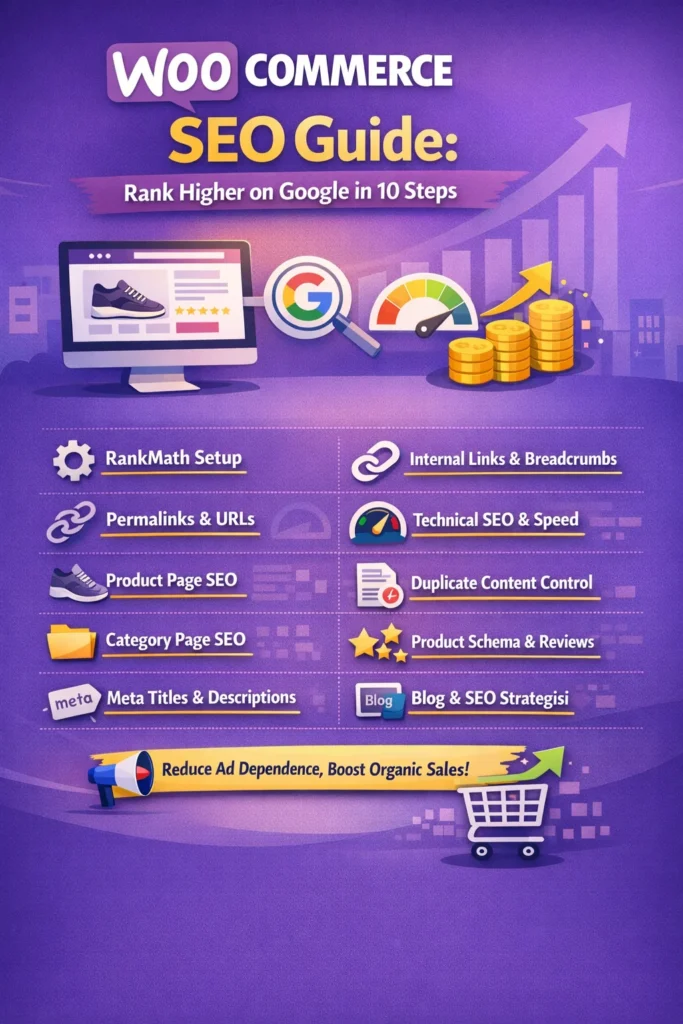
1) RankMath Settings: Build the Right Foundation
First, turn RankMath from “installed” into “actively used.”
What to do (plain explanation):
Run the RankMath setup wizard, enable WooCommerce options, select the correct site type, connect Search Console, and activate the sitemap. Then configure schema for products/categories and make clear index/noindex decisions.
Checklist:
- RankMath → Setup Wizard: Site type + social + Search Console connection
- RankMath → Sitemap Settings: Ensure Product / Product Category sitemaps are enabled
- RankMath → Titles & Meta:
- Products: index ON
- Product tags: noindex for most stores (to avoid thin content)
- Search pages / filter pages: noindex
- RankMath → WooCommerce: Product schema enabled; check if price/stock fields are pulled correctly
2) Permalinks and URL Structure
In SEO, the URL tells both Google and users what the page is about.
What to do (plain explanation):
Avoid complex parameters in product URLs. Keep category hierarchy clean, convert special Turkish characters into clean slugs, and remove unnecessary words.
Checklist:
- Settings → Permalinks: “Post name” usually works best
- Product URL example:
- ❌ site.com/?product=123
- ✅ site.com/womens-running-shoes/nike-air-zoom/
- Slug rules:
- short, descriptive, includes the keyword
- reduce unnecessary words like “and, with, for”
- Category depth: Don’t exceed 2 levels (Category → Subcategory → Product)
3) Product Page SEO: Title, Description, Images, Conversion
The biggest money in WooCommerce SEO comes from the product page.
What to do (plain explanation):
Write a unique title and description for every product. Don’t list only features — include benefits and real use cases. Optimize image alt text and enrich the page with an FAQ section.
Checklist:
- Product Title (H1):
- Brand + model + key feature + category
- Example: “Nike Air Zoom Men’s Running Shoes — Lightweight & Breathable”
- Short description (top section):
- 3–5 bullet points, benefit-focused (comfort, warranty, returns, shipping)
- Long description:
- “Who is it for?” “Where to use it?” “Fit/size” “Care instructions”
- Image SEO:
- File name: nike-air-zoom-mens-running-shoes.jpg
- Alt text: “Nike Air Zoom men’s running shoes”
- FAQ section:
- Returns, delivery time, sizing/fit, warranty, care
4) Category Page SEO: Your Main Traffic Machine
In many stores, category pages bring more organic traffic than product pages.
What to do (plain explanation):
Add a 150–300 word description at the top of each category. Below it, add “recommended subcategories” and internal links to relevant blog posts. A category page shouldn’t be just a product list — it should act like a mini landing page.
Checklist:
- Category top description:
- “What’s inside + buying guide + benefits”
- Internal linking:
- Link to a blog post like “How to choose running shoes?”
- Usually avoid indexing filtered pages (color/size) due to duplicate content risk
5) Meta Title & Meta Description: Increase Clicks
Ranking is important, but CTR (click-through rate) matters too.
What to do (plain explanation):
Use RankMath to write short, clear, sales-focused meta titles for products/categories. In your meta description, add strong click reasons like free shipping, discount, fast delivery, easy returns.
Checklist:
- Meta title formula:
[Product/Category] + [Main benefit] + [Brand] | [Store Name] - Meta description example:
“WooCommerce SEO-ready product page: fast shipping, easy returns, secure payment. Shop now!”
6) Internal Linking and Breadcrumbs: Help Google Understand Your Store
Google “understands” your site through links.
What to do (plain explanation):
Build a blog → category → product linking chain. Add relevant product/category links inside product descriptions. Enable breadcrumbs for both SEO and user experience.
Checklist:
- Breadcrumbs: Enable via theme or RankMath/SEO settings
- Link from blog posts to related categories/products
- On product pages:
- “Frequently bought together”
- “Similar products”
- Avoid orphan pages (products with no internal links)
7) Technical WooCommerce SEO: Speed, Mobile, Core Web Vitals
WooCommerce stores can slow down easily — and a slow site means lower rankings + lower sales.
What to do (plain explanation):
Measure first, then fix. Remove unnecessary plugins. Use caching + image optimization + CDN. On mobile, menus, filters, product images, and the checkout flow should be fast and smooth.
Checklist:
- Measurement: PageSpeed + Search Console performance reports
- Key speed actions:
- Cache plugin (page cache + browser cache)
- Image compression + WebP
- Lazy load (especially on category pages)
- CDN (if you have global visitors)
- WooCommerce-specific:
- Exclude cart/checkout pages from cache
- Watch heavy variation products (images/scripts)
8) Duplicate Content and Index Management: Control Thin Pages
WooCommerce automatically generates pages (tags, filters, archives). If uncontrolled, these can split your SEO power.
What to do (plain explanation):
Decide which pages should be indexed and set the rest to noindex. Use canonical URLs correctly. Limit cases where variations create separate URLs and duplicate pages.
Checklist:
- Often set to noindex:
- product tags
- filter parameter pages
- internal search results pages
- Canonical:
- similar pages should point to the main version
- Variations:
- if color/size creates multiple indexable URLs, control it
9) Product Schema and Rich Snippets: Star Ratings in Results
If product schema is correct, Google may show price, stock, and ratings in search results.
What to do (plain explanation):
Check RankMath Product schema settings. Make sure price, stock status, and SKU fields are filled. If you use reviews, keep them real and natural.
Checklist:
- Always fill:
- price
- stock status (in stock/out of stock)
- brand (if available)
- SKU
- Reviews:
- don’t use fake reviews (risk)
- encourage reviews via post-purchase emails
10) Blog + WooCommerce SEO Strategy: From Organic Traffic to Sales
Blog content fuels your product and category pages with SEO power.
What to do (plain explanation):
For each main category, publish 3–5 supporting blog posts. Answer real user questions, create buying guides, and naturally link to related categories/products.
Checklist:
- Blog topic examples:
- “How to choose running shoes?”
- “How to understand shoe sizing/fit?”
- “How to care for sports shoes in winter?”
- In every post:
- 2–5 internal links (category + related product)
- an FAQ section (featured snippet chance)
WooCommerce SEO Quick Checklist
- RankMath WooCommerce settings enabled
- Product/category titles + meta descriptions optimized
- Category descriptions written (landing-page approach)
- Images in WebP + proper alt text
- Breadcrumbs + internal link structure built
- Filter/tag/search pages set to noindex
- Speed optimization (cache + images + CDN)
- Product schema correct; price/stock filled
- Blog content drives traffic to categories/products
Reduce Your Dependence on Ads with WooCommerce SEO
WooCommerce SEO isn’t “set it once and forget it.” It needs ongoing improvements. But if you build the foundation correctly: category pages bring traffic, blog posts support, and product pages convert into sales.